How about using the Lambda function and not worrying too much about availability with guaranteed execution and direct access to DynamoDB?
The purpose of this article is to show you in a simple way how to create a serverless lambda function with direct access to DynamoDB.
I assume that you already have knowledge of JavaScript, AWS, Lambda concept and Serverless framework. Ok?
Let’s start!
Let’s create a simple function that performs a query on the DynamoDB database. See the example code below:
index.js
"use strict"

const AWS = require('aws-sdk');
AWS.config.update({region: 'us-east-1'});
const ddb = new AWS.DynamoDB({apiVersion: '2012-08-10'});

const params = {
  ExpressionAttributeValues: {
    ':id': '67554837_xxx',
  },
  KeyConditionExpression: 'Id = :id',
  ProjectionExpression: 'Id, createdAt',
  TableName: 'Table_Name',
};

exports.handle = async function(event, context, callback) {
  try {
    const dyn = await ddb.query(params, (err, data) => {
      if (err) {
        console.error('Error', JSON.stringify(err, null, 2));
      } else {
        console.log('Success');
        data.Items.forEach((item) => {
          console.log('item:', item);
        });
      }
    }).promise();

    return dyn;
  } catch (e) {
    console.log(e);
    return e
  }
}
Let’s go to the serverless configuration now.
In the serverless.yml file we will configure the following:
What’s inside the custom key are variables that are declared. It’s a place to declare different types of variables.
Serverless has plugins that are community created extensions to what it can do.
In this case we are using some plugins, and specifically the serverless-domain-manager plugin requires some variables declared inside the custom to know how to make the correct DNS annotations (for friendly DNS terms to connect to the API Gateway it creates).
To access other AWS services, another plugin is used, which is serverless-iam-roles-per-function. Which allows Serverless to interpret these settings correctly:
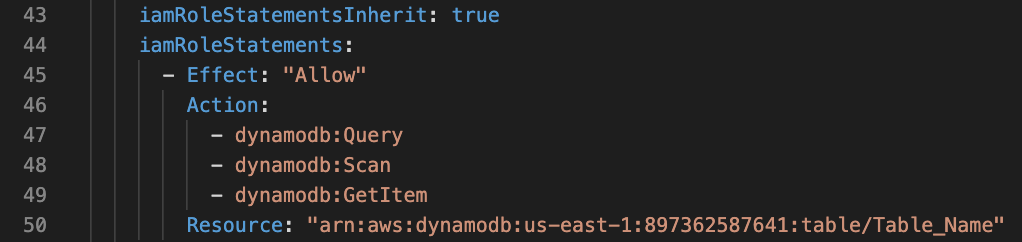
See full serverless.yml file below:
"use strict"

const AWS = require('aws-sdk');
AWS.config.update({region: 'us-east-1'});
const ddb = new AWS.DynamoDB({apiVersion: '2012-08-10'});

const params = {
  ExpressionAttributeValues: {
    ':id': '67554837_xxx',
  },
  KeyConditionExpression: 'Id = :id',
  ProjectionExpression: 'Id, createdAt',
  TableName: 'Table_Name',
};

exports.handle = async function(event, context, callback) {
  try {
    const dyn = await ddb.query(params, (err, data) => {
      if (err) {
        console.error('Error', JSON.stringify(err, null, 2));
      } else {
        console.log('Success');
        data.Items.forEach((item) => {
          console.log('item:', item);
        });
      }
    }).promise();

    return dyn;
  } catch (e) {
    console.log(e);
    return e
  }
}
Deploy your function
There are some efficient ways to deploy the function. Via command line or using AWS Serverless CI/CD to automate the deployment process in a production environment, for example.Command line
$ serverless deployFor more details and other command execution options, take a look at the serverless doc: https://www.serverless.com/framework/docs/providers/aws/cli-reference/deploy
For a production environment, look at this AWS dochttps://aws.amazon.com/quickstart/architecture/serverless-cicd-for-enterprise/
Related Articles

JS: Don’t block the event loop
In my early days of JavaScript programming, I stumbled upon a curious comment in an issue ...
Read more
Deep Dive Into Javascript Engines — Blazingly Fast ⚡️
A quick summary first. There is no single Javascript engine, there are a lot and I will go...
Read more
A React Custom Hook for Forms
Forms are one of the most usual components of modern web applications. There’s a lot...
Read more
Page Scroller using Web Speech API
Would you like to try something using Web Speech API?! How about scrolling a web page usin...
Read more